The Microsoft 365 Price Rise Is a Useful Deadline — If You Use It Properly
The July 2026 Microsoft 365 price rise is not just a cost problem. It is a decision deadline.
Handled badly, it becomes another invoice increase. Handled properly, it becomes the moment you finally clean up your tenant, your licences and your Microsoft strategy.
The easiest way to lose money on Microsoft 365 in 2026 is to do nothing.
Not because Microsoft 365 is poor value. For most organisations, it is the opposite. The Microsoft stack contains far more capability than most businesses use properly.
The problem is the quiet renewal.
A renewal date arrives. The invoice changes. Somebody in finance notices the increase. IT explains that Microsoft pricing has moved. Everyone is busy. The organisation pays, grumbles, and carries on with the same licence waste it had the year before.
That is the expensive version.
The better version is to treat the price rise as a deadline.
A deadline to audit what you have.
A deadline to remove what you do not use.
A deadline to stop paying twice for the same capability.
A deadline to decide whether your current Microsoft plan still matches the way your business actually works.
The price rise is not the whole story
It is tempting to talk about Microsoft 365 pricing as if the only issue is the percentage increase.
That misses the bigger point.
For many organisations, the increase is simply exposing an older problem: nobody has properly reviewed the tenant in years.
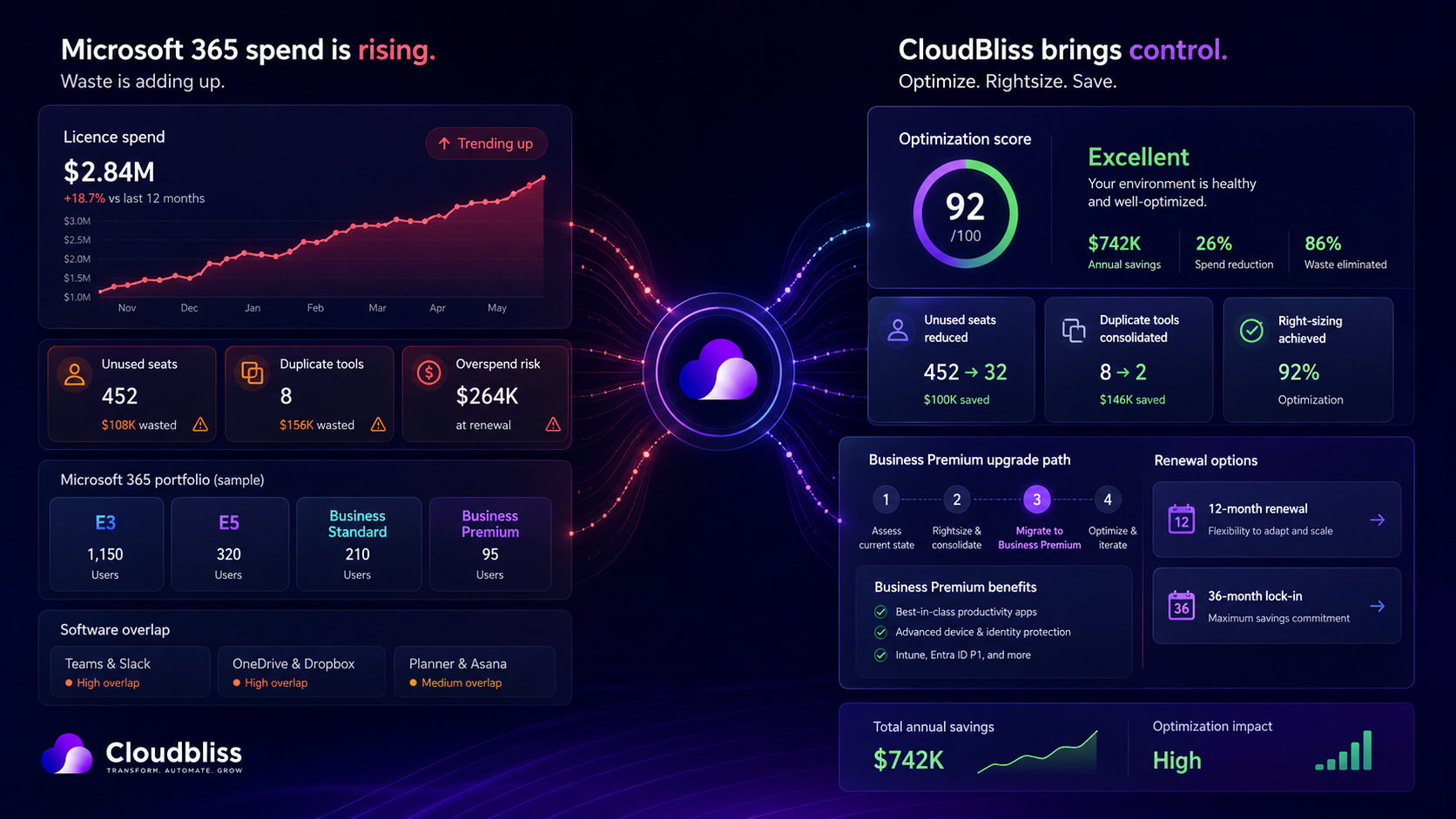
Users have left but licences remain. Shared mailboxes sit on paid licences. Service accounts are over-provisioned. Some users have higher-tier licences than their role needs. Add-ons were bought for projects that ended. Third-party tools still get paid even though Microsoft now includes similar capability inside the subscription.
The price rise hurts because the baseline was already messy.
That is where the opportunity sits.
If you clean the baseline before renewal, the increase becomes much easier to absorb — and in some cases, you can reduce total spend even after the new pricing lands.
The three questions every organisation should answer before renewal
Before signing another Microsoft 365 term, ask three questions.
1. Are we paying for people who are not using the platform?
This is the fastest place to find savings.
Look for users with no recent sign-in activity. Check leavers. Check long-term absence. Check duplicate accounts. Check whether shared mailboxes have paid licences they do not need.
This is not glamorous work, but it is usually profitable work.
A 200-person organisation does not need many unused licences before the annual waste becomes visible.
2. Are we paying for more capability than each role needs?
Not every employee needs the same licence.
Some users need advanced security, compliance, analytics and device management. Others mainly need email, Teams and core productivity tools. Frontline workers may need a different model again.
The goal is not to downgrade everyone. That would be blunt and risky.
The goal is to match licence tiers to actual role requirements.
Right-sizing is not about being cheap. It is about being accurate.
3. Are we buying tools Microsoft already gives us?
This is the one many businesses miss.
Microsoft 365 has expanded significantly. Depending on your plan, you may already have access to device management, endpoint protection, identity controls, information protection, Teams calling capabilities, forms, automation, analytics and more.
That does not mean every third-party tool should be removed. Some are excellent and still justified.
But it does mean every renewal should include a duplication review.
If you are paying for Microsoft 365 and then separately paying for tools that solve the same problem, someone should be able to explain why.
The Business Premium question
For many UK SMEs, Business Premium deserves a fresh look.
That does not mean it is right for everyone. It does mean the value equation has changed for organisations that currently sit on Business Standard plus a collection of separate security and device tools.
Business Premium can bring together productivity, identity, device management and security capability in a way that is often cleaner than a patchwork of separate products.
The commercial question is simple:
Would upgrading reduce separate spend, simplify support and improve security enough to justify the move?
For some firms, the answer will be yes. For others, not yet.
But it should be a deliberate decision, not an assumption based on what you bought three years ago.
The hidden cost of Microsoft underuse
The most expensive Microsoft 365 tenant is not always the one with the highest licence tier.
It is often the one where the organisation pays for capability it never operationalises.
You have Teams, but projects still run through email chains.
You have SharePoint, but documents still live in local folders.
You have Power Automate, but approvals are still chased manually.
You have Intune, but devices are managed inconsistently.
You have security tools, but no one has configured them properly.
You have Power BI, but management reporting still depends on spreadsheet packs.
That is where Microsoft 365 becomes misunderstood.
The subscription is not the value. The operating model is the value.
If the platform is only being used as email, storage and chat, then yes, it will feel expensive. If it becomes the backbone for device management, workflow, reporting, security, collaboration and AI readiness, the economics look very different.
A practical renewal plan
You do not need to boil the ocean before renewal.
You need a focused review.
Step 1: Export your licence position
Get a clean view of all SKUs, assigned users, unassigned licences, add-ons and billing terms.
Step 2: Compare licence assignment to activity
Look at sign-ins, mailbox activity, Teams usage, OneDrive activity and application usage. Activity data will not tell the whole story, but it will show where to investigate.
Step 3: Identify waste patterns
Tag each issue:
- Inactive account
- Leaver or ghost account
- Oversized licence
- Shared mailbox with unnecessary licence
- Dormant add-on
- Duplicate third-party tool
- Copilot or premium feature underuse
Step 4: Model the renewal scenarios
Do not just ask, “What will this cost next year?”
Model options:
- Renew as-is
- Right-size first, then renew
- Move selected users to a different SKU
- Upgrade where consolidation makes sense
- Consider longer commitment where headcount is stable
- Keep flexibility where headcount is uncertain
Step 5: Turn savings into a roadmap
The best licence reviews do not stop at cost reduction.
They answer, “What should we do with Microsoft next?”
That might mean device management, Power Platform governance, Copilot readiness, Teams Phone, Power BI reporting or security hardening.
Savings are useful. Reinvestment is where the transformation happens.
The mistake to avoid: treating this as procurement only
A Microsoft 365 renewal is not just a procurement event.
It is a technology strategy event hiding inside a procurement deadline.
If the conversation stays only with procurement, the organisation may negotiate a slightly better version of the wrong setup.
The right conversation includes finance, IT, operations and senior leadership. Not for a giant committee meeting, but because Microsoft 365 now touches how the whole business works.
Finance cares about cost.
IT cares about control and security.
Operations cares about process efficiency.
Leadership cares about productivity and risk.
A good renewal strategy connects all four.
The Cloudbliss view
We think most Microsoft 365 renewals are too passive.
The platform has changed. The pricing has changed. The AI roadmap has changed. The security expectations have changed. Your renewal process should change too.
That does not mean every organisation needs an expensive transformation programme.
It does mean every organisation should know exactly what it is paying for, what it is using, what it is wasting, and what it should consolidate before signing another term.
A proper licence review is not just a spreadsheet exercise. It is the front door into a better Microsoft operating model.
Final thought
The July 2026 price rise will hit many organisations as an unwelcome cost increase.
It does not have to.
Handled properly, it can be the forcing function that finally gets the tenant cleaned up, the licences right-sized and the Microsoft roadmap aligned to the business.
The invoice is coming either way.
The question is whether it arrives before or after you have done the work.
If your Microsoft 365 renewal is due in the next 12 months, Cloudbliss can help you understand the real cost position before you lock in another term.
Book a renewal discussion or start with the fixed-scope Cloudbliss Licence Health Check to identify inactive accounts, oversized licences, duplicate tools, add-on waste and practical savings opportunities.